The SSH, RDP & VNC client
your Mac was missing.
Keep SSH, SFTP, RDP, VNC, Telnet and your Mac’s own shell side by side. Organize sessions in a tree, connect through jump hosts and move files in a dedicated SFTP tab.
brew install --cask pkhorenyan/tap/termstead
Free & open source · macOS 14 Sonoma or later · Apple silicon & Intel · Signed and notarized

Made for people who keep a lot of servers in their head.
Everything sits one click away, and nothing gets between you and the shell.
Sessions in a tree
Groups, colors, icons and pinned favorites. Search it, or walk it with the arrow keys and press Return.
Remote desktops in tabs
Open RDP and VNC desktops in any pane, directly or through SSH jump hosts.
Jump hosts, chained
As many hops as the network needs, each with its own user, key or password.
Your Mac’s own terminal
⌥⌘T opens your shell in a tab, beside the servers — with this Mac’s files in the sidebar, following its cd.
Snippets
Commands you type often, sent with ⌃⌥1–⌃⌥9 to the tab in front — or to every pane with broadcast input.
Port forwarding
Local, remote and SOCKS tunnels on a connection of their own, each with its own switch.
Standalone SFTP sessions
Browse your Mac’s files alongside a remote SFTP tab. Drag files and folders between panels and track uploads and downloads in the transfer queue.
Secrets in the Keychain
Typed for you when ssh asks, and only for the host they were saved for.
Server load at a glance
CPU, memory, disk and network of the server in front, in the status bar.
Bring your ~/.ssh/config
Your existing hosts become sessions in one click.
Remote desktops,
right in a tab.
Open RDP and VNC desktops next to your terminals, directly or through SSH jump hosts. VNC supports a VNC password and Apple Remote Desktop credentials.
 A remote desktop, next to ssh tabs
Fits the tab, sharp on Retina
Through bastion-01, like any session
RDP clipboard and drives
Copy text and files between Finder and Explorer, or share a Mac folder as a drive.
VNC display and input
Fit, zoom or go full screen. Use a keyboard profile for macOS, Windows or Linux, or switch to view-only mode.
VNC clipboard and files
Control text sharing in each direction, with Unicode on macOS Screen Sharing. Enable SSH file transfer to copy files through the SFTP sidebar.
Four servers, one window.
Side by side, stacked or in four, each pane with its own tabs. With broadcast input on, one command runs on every server you can see.
 Every pane has its own tabs
Typed once, sent to all four
Load of the server in focus
Move files between your Mac and server.
Open a standalone SFTP session with an SSH key or password, directly or through jump hosts. Your Mac’s files appear on the left and the server’s files open in the connected tab.
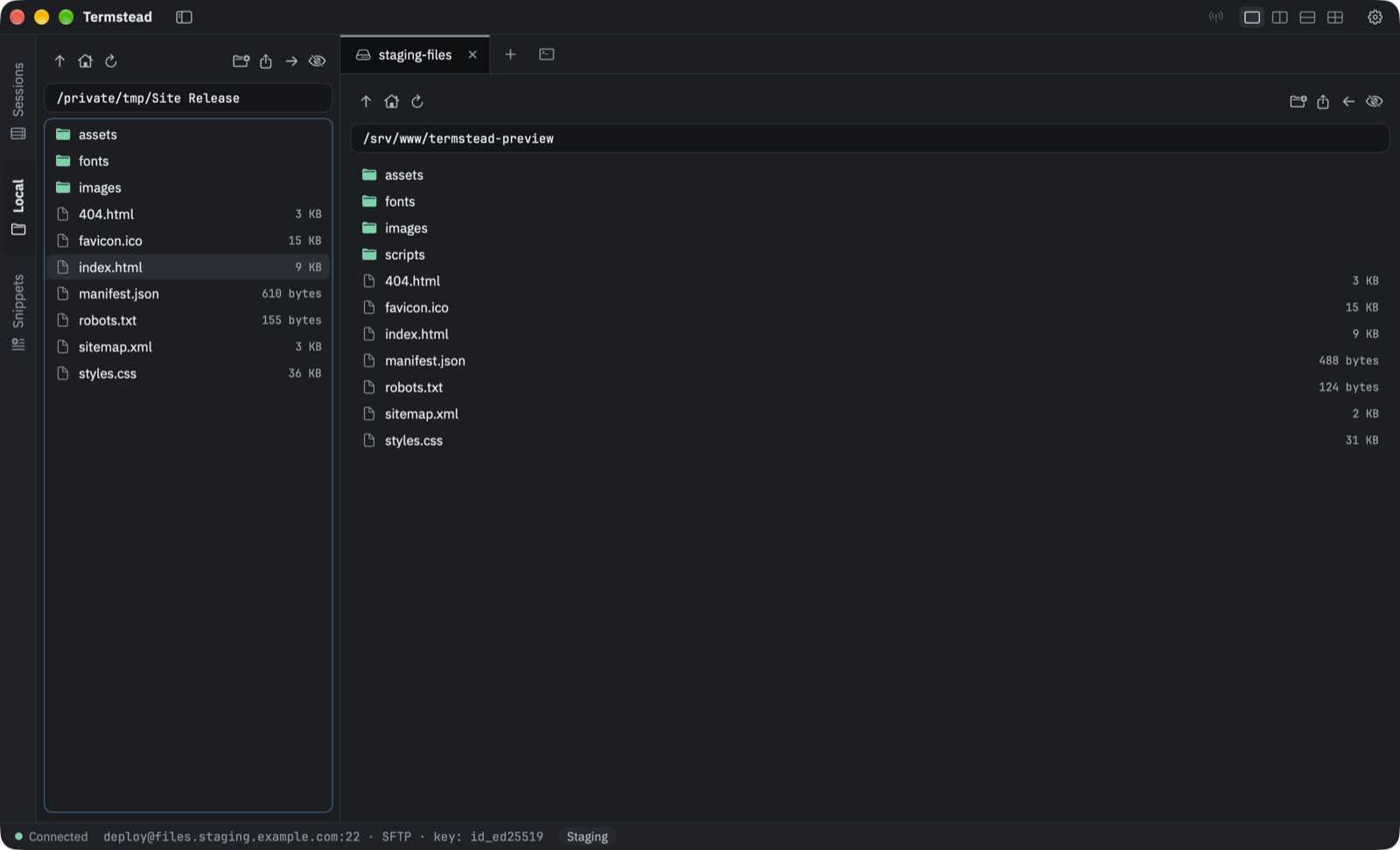
Drag files between panels
Upload or download files and folders by dropping them into the open location or onto a destination folder.
Track and retry transfers
See progress per file, cancel transfers or queue a retry. The queue stays visible if the connection drops.
Handle matching names
Choose what to do with a name conflict for one file or the rest of the group.
The small things that add up.
- Tabs you can arrangeDrag, reconnect, duplicate — and reopen them at the next launch.
- Duplicate a sessionA copy with the same jump hosts, tunnels and saved passwords.
- Find and highlightSearch with ⌘F. New output keeps your place in the scrollback, and errors, IPs and URLs stand out.
- Eight themesNord, Synthwave and six more, with any monospaced font.
- Prompt iconspowerlevel10k and Starship glyphs, with no Nerd Font to install.
- Edit remote filesOpen one in any Mac app; every save goes back to the server.
- Tabs come back by themselvesDropped by sleep, Wi-Fi or a VPN, they reconnect once the network is back.
- Telnet for older gearConnect directly or through SSH jump hosts, with logs, snippets and broadcast input.
- Terminal session logsSave SSH, Telnet or local terminal output as plain text, with timestamps.
- Import and export sessionsMove the tree or a folder with its jump hosts. Preview conflicts and optionally include saved passwords in an encrypted export.
- Multiline pasteKeep blank lines, indentation and Unicode in terminal editors, including with broadcast input.
- Room for the terminal⌘B hides the sidebar.
- Text size and zoom⌘+ and ⌘− per tab, or a remote desktop’s zoom.
- Updates itselfEvery update verified against the project’s key.
It’s the real OpenSSH.
Every SSH tab runs the system ssh, so your agent, ~/.ssh/config, known_hosts and ProxyJump work exactly as they do in Terminal.
- 0
Lines of SSH code of its own
Connections, keys and encryption are the system OpenSSH’s.
- 1
Host per saved password
Handed to ssh only for the exact user@host, and only once.
- 0
Accounts, analytics, trackers
Sessions and snippets stay on your Mac. Nothing is sent anywhere.
- 2
Remote desktop engines
FreeRDP and LibVNCClient run in their own processes. RDP requires TLS, and VNC can require verified X.509 VeNCrypt.
Your hands stay on the keys.
- ⌘NNew session
- ⌘KQuick connect
- ⌘T⌘WNew / close tab
- ⌥⌘TLocal terminal
- ⌃⌥1⌃⌥9Snippets
- ⌘D⇧⌘DSplit side by side / stacked
- ⌥⌘IBroadcast input
- ⌘BHide the sidebar
- ⌘FFind
- ⌘+⌘−Text size · desktop zoom
Get Termstead.
Free, open source, and set up in a minute.
brew install --cask pkhorenyan/tap/termstead
- macOS 14 Sonoma or later
- Apple silicon & Intel
- Signed and notarized
- Updates itself, every update verified